
My acquisition stack, powered by MCPs & Claude
I said I'd integrate AppsFlyer. Here's what the full stack looks like now.

I love experimenting, testing new things, building new workflows, making them better. I also have an incredible partner who’s an even earlier adopter than me, so between the two of us I’m constantly reaching my Claude subscription limits and connecting new MCPs. So yes, here’s more MCP content, not only because I like it, but also because people engage with it.
The headline for this edition: I finally integrated AppsFlyer MCP! I said I would in a previous article, and here we are. But that’s just one piece of it.
This edition is about the full acquisition stack: what’s working, what’s still rough, and what I’ve started building on top of it. I’m managing 4 apps and 3 games across multiple clients. This is how I run it.
ASO + ASA: what’s changed since the last two articles
The Astro MCP setup is documented, as well as a first look at linking Apple Ads API.


What I want to talk about here is what daily use across several apps actually looks like. Because the multi-app context problem is real with constant switching between clients. So now the workflows are running, with frequent organic gap analysis, cannibalization checks, localisation updates, moving organic search terms into ASA… All of these that used to take few hours, now takes only few minutes. Results are there, clients are happy, apps are growing.
Connecting the Apple Search Ads API: the short version
Apparently that’s something you’re interested in, so the full ASA API setup guide is coming! In the meantime, you need to prepare 3 things:
Apple Ads API credentials
A dedicated folder for Claude Code to run from, for privacy and security purposes
A
.envfile with your keys.
Start Claude Code from inside that dedicated folder. From there, Claude can read campaign data, pull keyword performance, update bids or daily budgets, create ad groups, add keywords in bulk… all via prompt.
I’ve started slowly at first, with read-only actions until I fully trusted the setup. Then I asked it to generate CSVs with my changes so I could upload them directly into ASA. Once I realised this was working like a charm, I’ve started using it to bulk rename ad groups, update CPT bids for certain type of keywords only, and upload translated terms in dedicated ad groups.
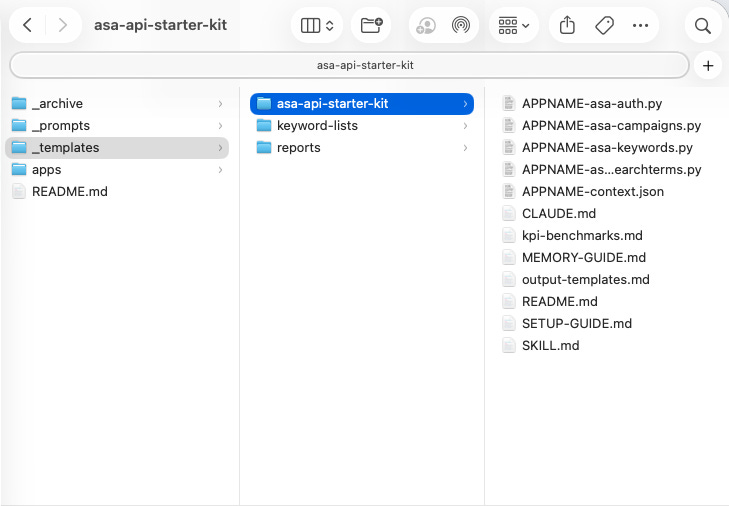
The full guide with downloadable setup from auth flow, error handling, security config and the prompts I use will be dropping soon. Stay tuned!
The intelligence layer: markdown files, Claude.md & Claude Projects
Before I integrated AppsFlyer, I needed to solve a more fundamental problem. Claude has no memory between sessions, and every new chat starts from zero.
I found the solution in different places, from a workflow shared by Andrea Fuertes, to asking around and seeing how most people used structured files as a base and built from there.
The principle: before you connect any MCP or run any analysis, you create structured .md files for each client. That gives Claude everything it needs to work on that account from the first message, from account structure to ROAS targets by geo and time window, scaling rules, current priorities, historical context.
In Claude.ai, you create a Project per client and upload those files as project instructions. Every session opens with full context already loaded.
In Claude Code, the equivalent is
CLAUDE.md: a plain text file that lives in your project folder and gets read automatically every time a session starts. No prompting, no re-explaining. Whatever you put in it becomes Claude’s permanent starting point: your rules, your account structure, your naming conventions, what it can and cannot do without asking.
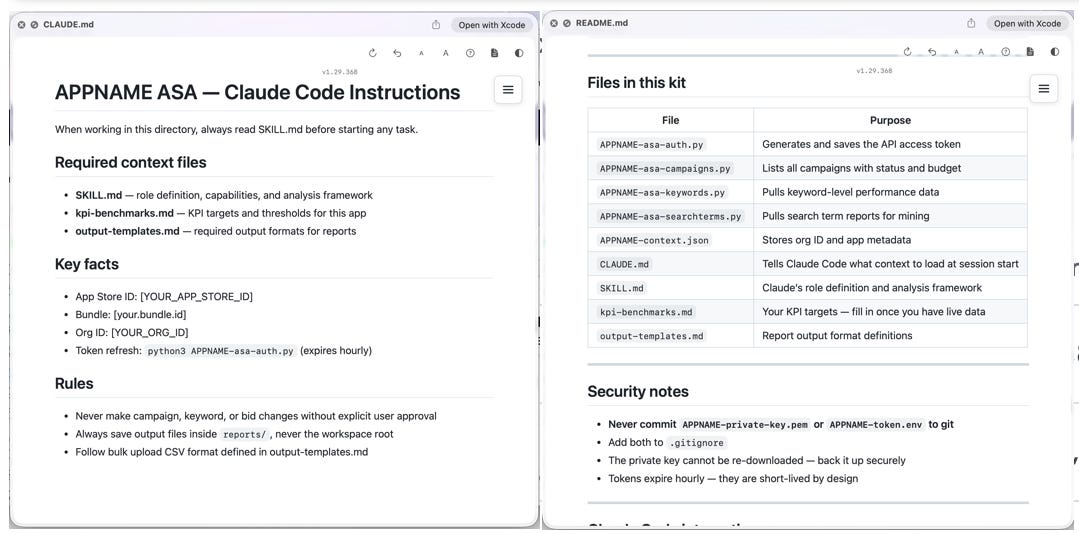
I’ve also added a change log, saving automatically each session. Every action gets appended to a memory file with date, campaign, what changed, before and after values. Come back 3 weeks later, ask “what did we change on May 19th?”, and you get an answer.
Write it once. It applies forever, and evolves with the work.
It took a few hours to build properly. It’s saved far more than that. (Full breakdown in the Apple Ads API setup guide - coming soon).
How to set up CLAUDE.md for Apple Ads
CLAUDE.md is a plain text file Claude Code reads automatically at the start of every session for permanent context.
Step 1 - Create a dedicated project folder on your computer with one folder per client. /!\ Don’t run Claude Code from your home directory, keep it isolated.
Step 2 - Create the file and fill it in
## Required context files
- SKILL.md — role definition and analysis framework
- kpi-benchmarks.md — KPI targets and thresholds for this app
- output-templates.md — required output formats for reports

## Key facts
- App Store ID: [YOUR_APP_STORE_ID]
- Bundle: [your.bundle.id]
- Org ID: [YOUR_ORG_ID]
- Token refresh: python3 APPNAME-asa-auth.py (expires hourly)

## Rules
- Never make campaign, keyword, or bid changes without explicit approval
- Always save output files inside reports/, never the workspace root
- Follow bulk upload CSV format defined in output-templates.md
Three companion files live alongside it:
SKILL.mddefines how Claude should analyse and think about the accountkpi-benchmarks.mdholds your targets and ROAS thresholds (following Andrea Fuertes guide)output-templates.mdlocks the format for bulk upload on ASA so output is ready to use if API is not working (create keywords, update bids, add negative keywords…)
Step 3 - Start Claude Code from that folder
cd /your-client-folder
claude
To summarise, CLAUDE.md gives Claude facts, while SKILL.md gives it a framework for thinking about the account. The combination is what makes sessions feel like a continuation rather than a cold start everytime.
The token refresh command in Key facts is a small detail that saves real friction, since Apple Ads API Token has to be updated hourly. Claude knows to flag when auth is about to expire without having to track it manually.
AppsFlyer MCP: finally integrated!
In the last piece I said integrating a MMP was the next step for me.
AppsFlyer MCP works in Claude.ai desktop, and I’ve been using it daily for geo and campaign level ROAS analysis across client accounts.
For one of the account I manage, it’s pulling D1 & D7 ROAS across 40+ markets and read it against the context I’ve provided in my markdown files with objectives, goals, thresholds. That part has changed how I approach campaign reviews and reporting. Performance and targets live in the same window, and Claude can pull it clearly in front of me before I make any decisions.
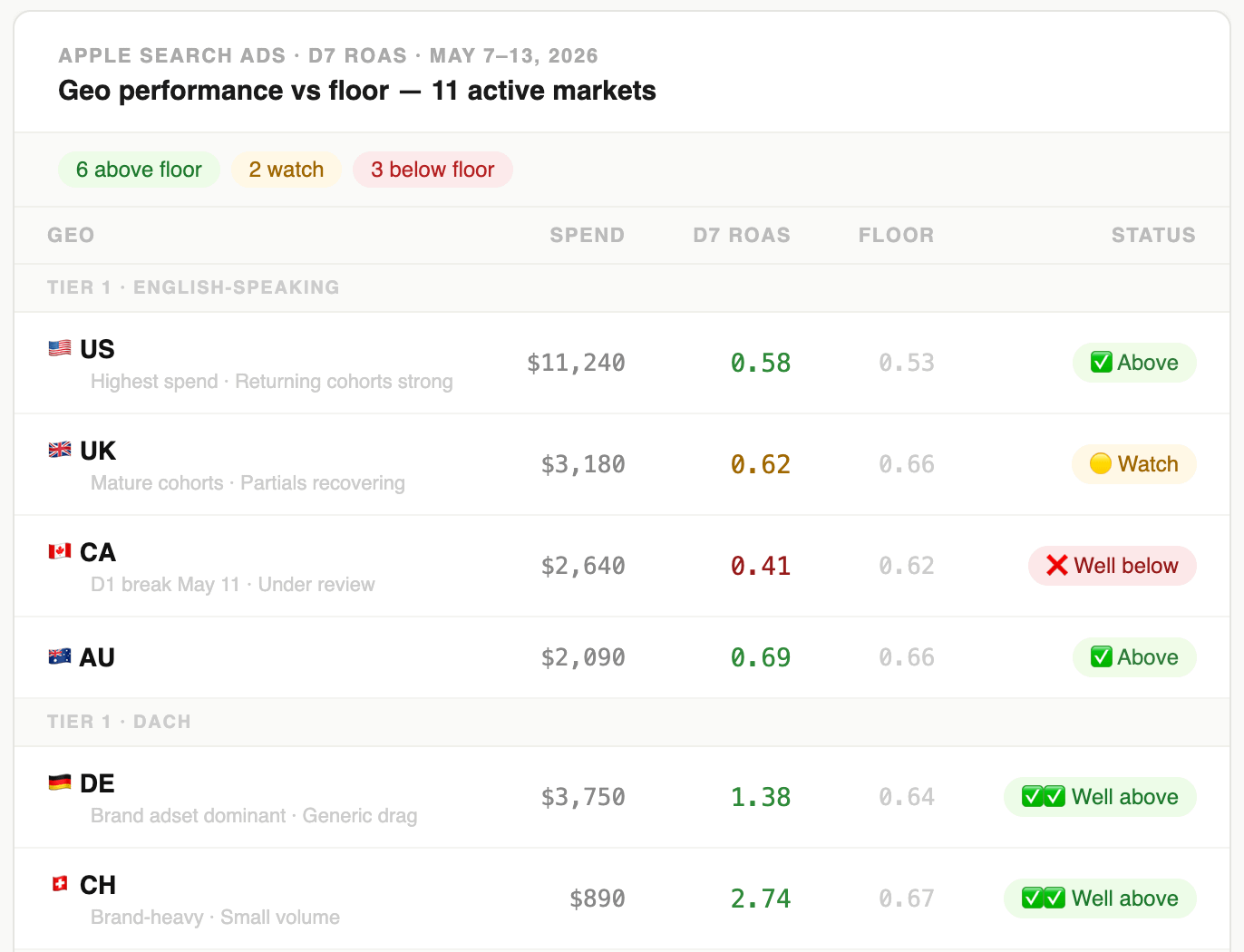
The only caveat is that I’m not using it in the same session as the Apple Ads API, since that one lives in Claude Code, while AppsFlyer lives in Claude.ai. I could potentially do it, but the setup requires an AF Admin access.
So in practice:
I pull the ROAS picture in Claude.ai via the AppsFlyer MCP, spot a pattern, go deeper either via the MCP or in the dashboard directly
Act on it in Claude Code via Apple Ads API, giving it instructions on how to optimize (drop / increase bids, move keywords, change budgets…)
Report automatically in a Notion database so I can follow it whenever without having to connect
The full loop I described last time, from keyword to install to downstream attribution, all in one workflow, isn’t there yet. That’s still the next step, but I’m really not sure when I’ll be able to achieve it.
Building tools: this is the part I’m most excited about
There’s a category of work I’ve always done in Excel that I’ve never loved: templates. You know, template for performance analysis, template to look at share of voice overtime, template to review Custom Product Pages…
The output was never pretty, always hard to hand off, and needs fifteen minutes of explanation before anyone else can use it.
So I’ve started building my own, and replacing these templates with actual tools that are interactive, intuitive, properly shareable.
And guess what… the first one is almost ready!
It’s for Apple Ads, looking at Impressions Share of Voice and easily comparing First vs All Ad Positions. Because yes it’s exciting to have more inventory, but also a pain point if you had a strategy in place and don’t want to mess it up. Here’s a snapshot, with dummy data of course!
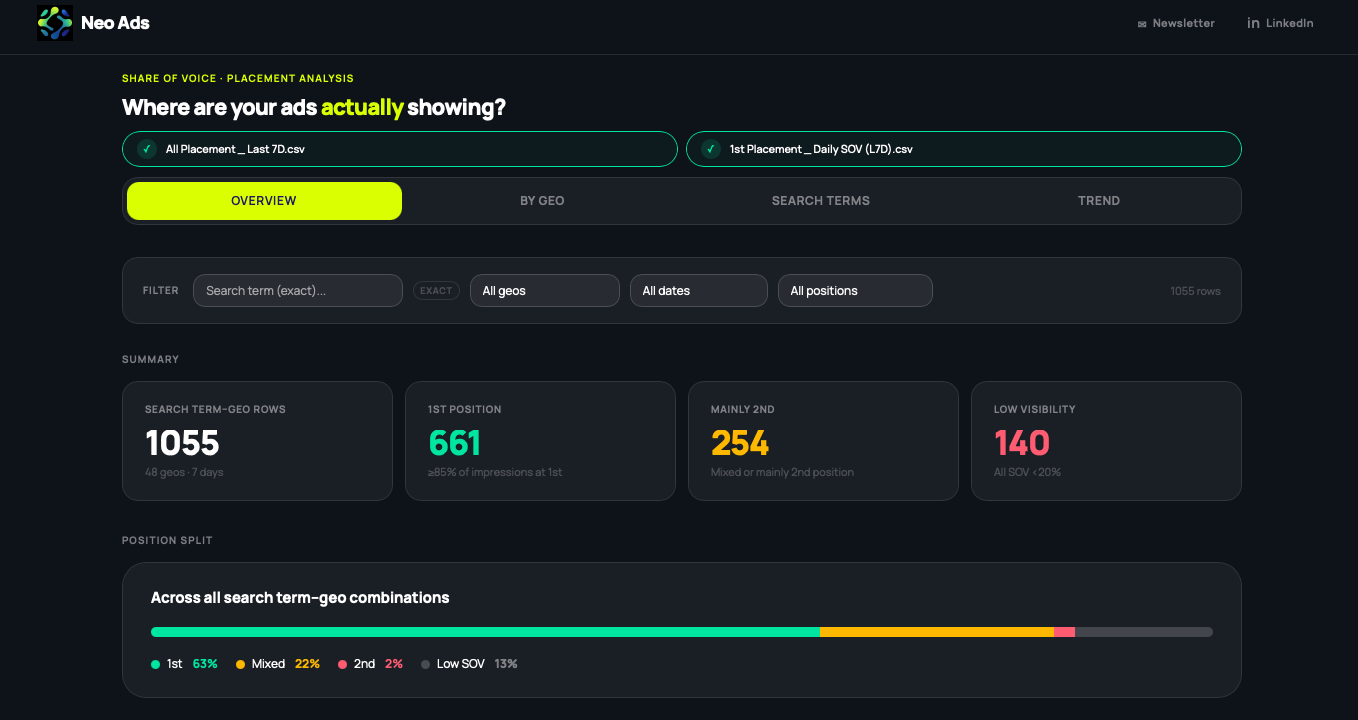
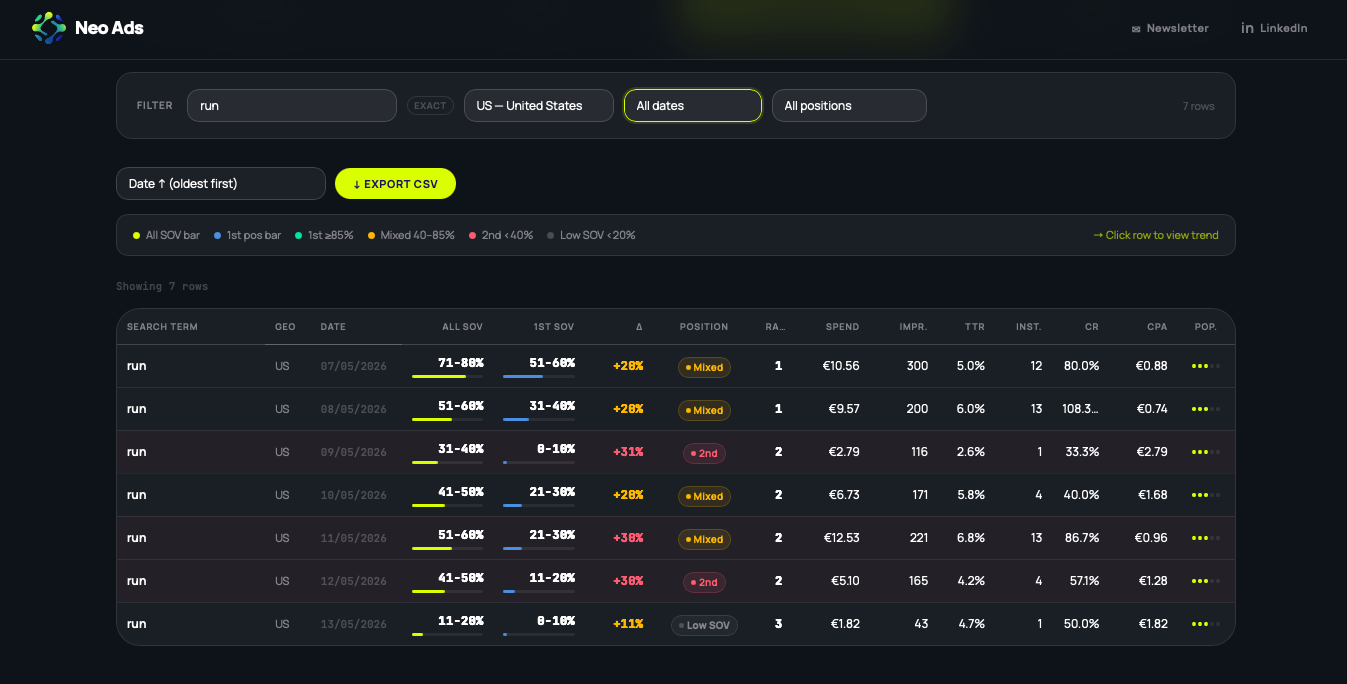
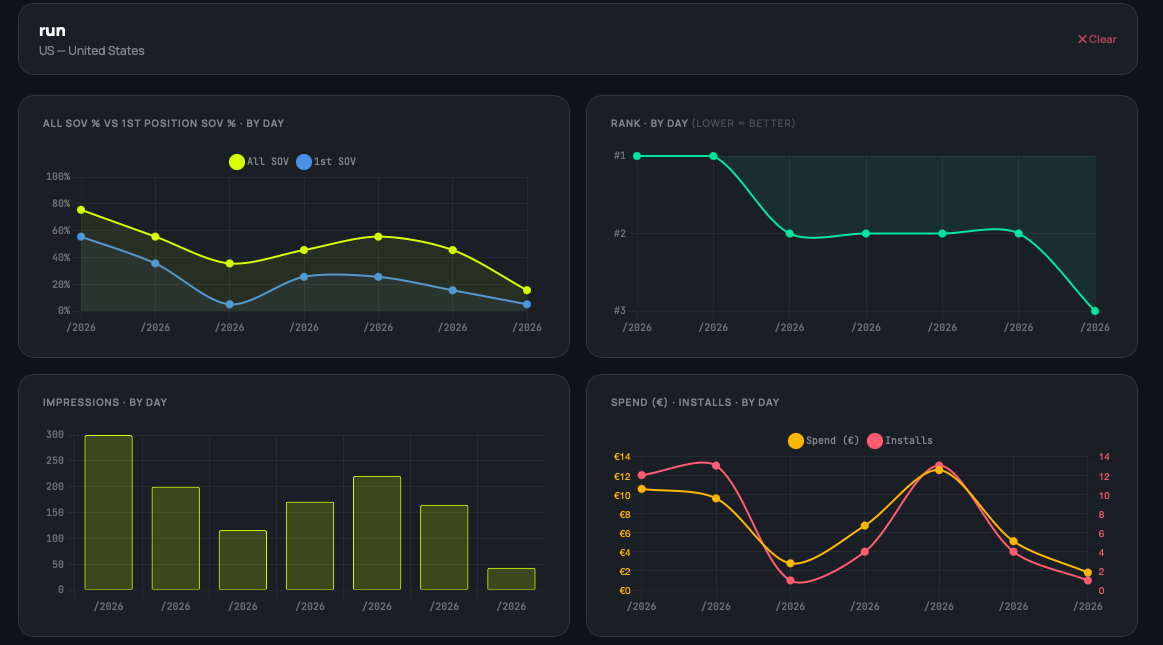
It’s free, and it’s dropping soon.
🎯 You might also like:

Conclusion
Let’s be honest… my work has been changing drastically in the past few months. Optimizing Apple Ads used to take most of my week, manually updating bids, running Excel scripts and creating templates to make my work slightly easier. And I’m not even starting with ASO, where keyword research across geos was simply a very large sheet of translations taken from Google.
Now the manual layer is delegated: keyword reviews, performance pulls, geo analysis, campaign restructures… everything handled. What’s left is the work that actually requires judgment and strategy: where to focus, which markets to push, what to test next.
At the end of the week, I do not work less, but I optimize more often. Campaigns are more efficient. I build tools that I can use to scale in less time that I would have taken to just run an analysis. That’s a real shift.
✨ Found this useful? Share it with someone building or growing an app.
Quick update on where NeoAds is going
This newsletter has been free since day one. It’s staying that way… mostly!
I want to be honest about why this is changing: I’m spending hours building flows, testing tools, and figuring out how to optimize my work. I believe some of that is worth more than a free article, as it actually generates real growth and revenue.
That’s why I’ve decided to introduce paid tiers, while keeping the free one as it is.
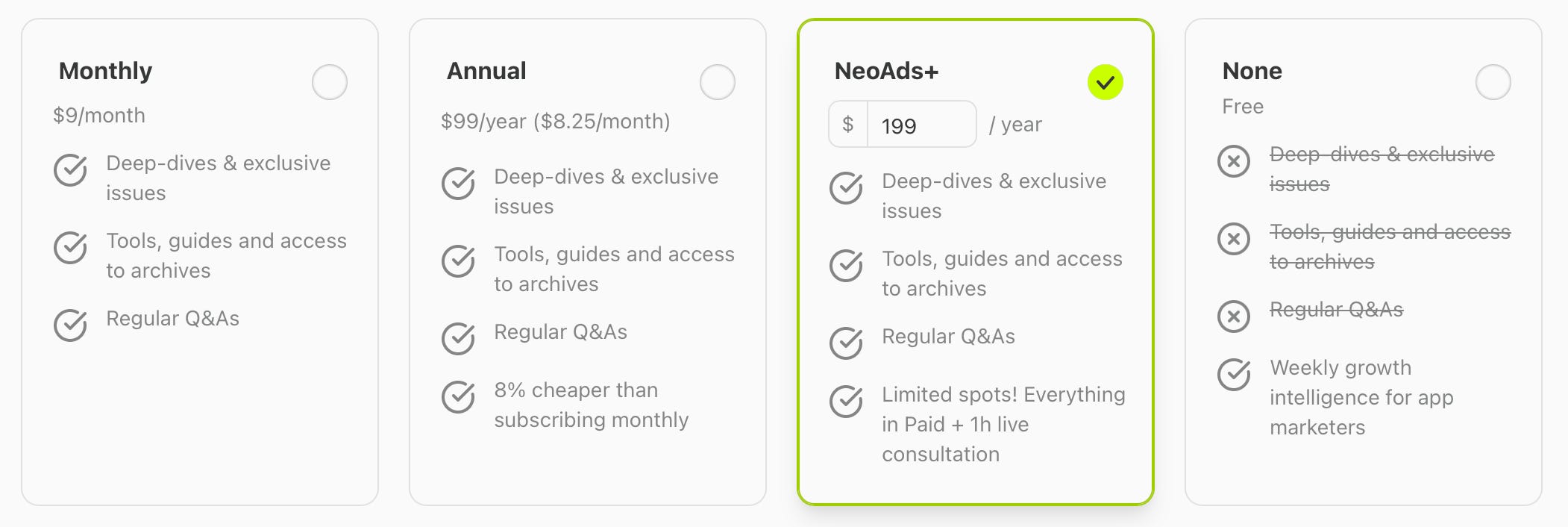
Free: nothing changes. Weekly newsletter, everything that’s always been here, and some bonuses coming for the people who’ve been around since the beginning.
Paid subscribers: deeper breakdowns, early access to tools and guides, and regular Q&As where you can drop your app, your challenge, your numbers, and get actual specific advice back.
NeoAds+: limited to 3 spots per month. You pay for a year upfront, get everything in NeoAds+, plus a 1-hour 1:1 consulting session with me, either to answer any question about this specific setup, or get a live ASO or ASA Audit. I’m running a limited offer at $199 for the first cohort - Book before it’s too late!
A lot going on, and more coming. It’s exciting, and honestly, I’m struggling to keep up sometimes. But I want to thank all of you for the time you take every week to read, share, and comment. I’ve realised this is only the beginning, and I have big plans for what’s coming.
Best,
Julie